
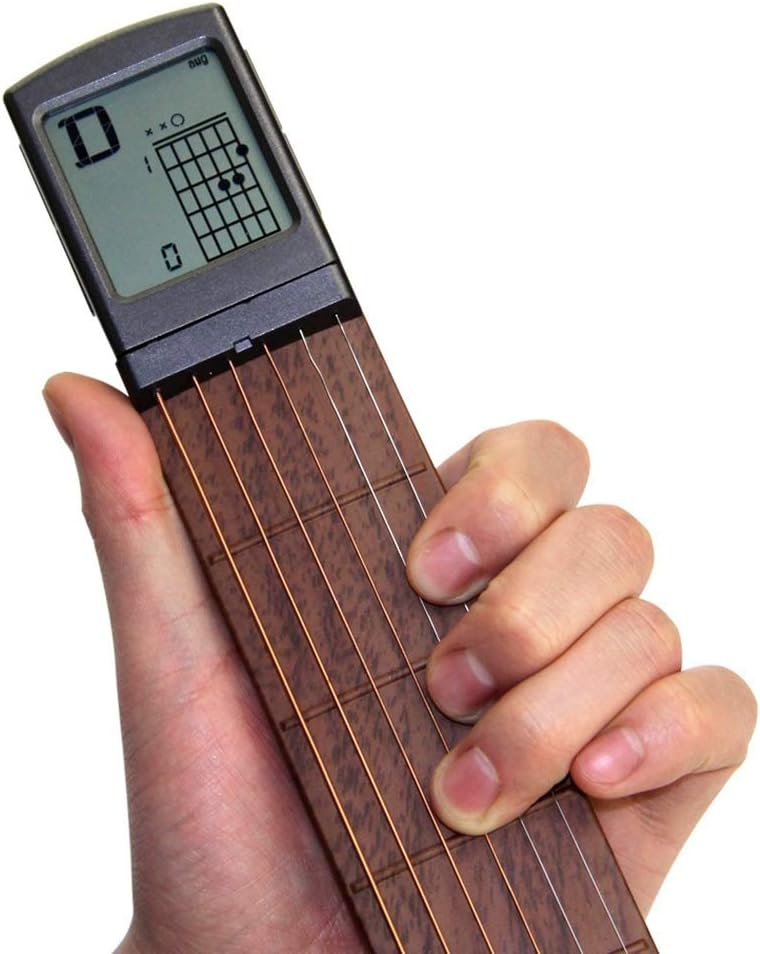
Description
- ♫ Smart Guitar Chords Training Tool – 6 String 6 Fret allowing you to practice more versatile scales and note combinations; design a rotatable screen which could display the most basic, common chords featuring precise finger positions, as we put over 400 kinds of chords inside the IC. Great for guitar beginners/ students to develop muscle memory for chords and is a perfect tool for finger placement exercise.
- ♫ Silent Chord Practice Only – No Sound & Not Tunable: This guitar trainer is designed for silent chord and finger placement practice. It does not produce guitar sound, as it aims to improve finger’s sensitivity without the environmental restrictions. Allows you to practice anywhere: cars, airplanes, subway, the office, school, dinner table. No noise means no restrictions.
- ♫ Genuine Strings – Equipped with genuine steel strings. Steel strings are plated to prevent rust. Practicing chords via the genuine guitar steel strings remains the same feel while playing guitar then. This ensures your chord and finger placement practice transfers seamlessly to actual guitar playing—no awkward adjustment when switching to your instrument.
- ♫ Portable & Convenient – Always Within Reach: Compact and lightweight, it fits easily into your pocket or bag. Includes a carry pouch for protection and portability. It is not as bulky as a guitar. Wherever life takes you, your guitar practice can come along. Battery CR2032 is included in package. The wrench allows you to adjust string tension to your preference, providing the perfect feel for extended practice sessions.
- ♫ Bonus Built-In Metronome – Stay in rhythm while practicing with the integrated metronome, adjustable to your preferred tempo. The metronome is for timing only—it does not produce guitar tones.
| Age Range Description | Kid |
|---|---|
| Instrument | Guitar |
| Unit Count | 1 Count |
| Number of Items | 1 |
| Number of Packs | 1 |
| Model Number | guitar tool |
| Manufacturer Part Number | guitar tool |
| Material Type | Alloy Steel |
| Size | Compact |
| Item Weight | 0.27 kg |
| Battery Description | Lithium |
| Number of Batteries | 1 Lithium Metal batteries required. (included) |
| Number of Keys | 4 |
| Number of settings | 1 |
| Educational Objective | Reading |
| Number of Players | 1 |
| Operation Mode | manual |
| Power Source | battery powered |
| Color | Brown |
| Theme | Music |

Portable Guitar CHords Trainer with Rotatable Display Screen
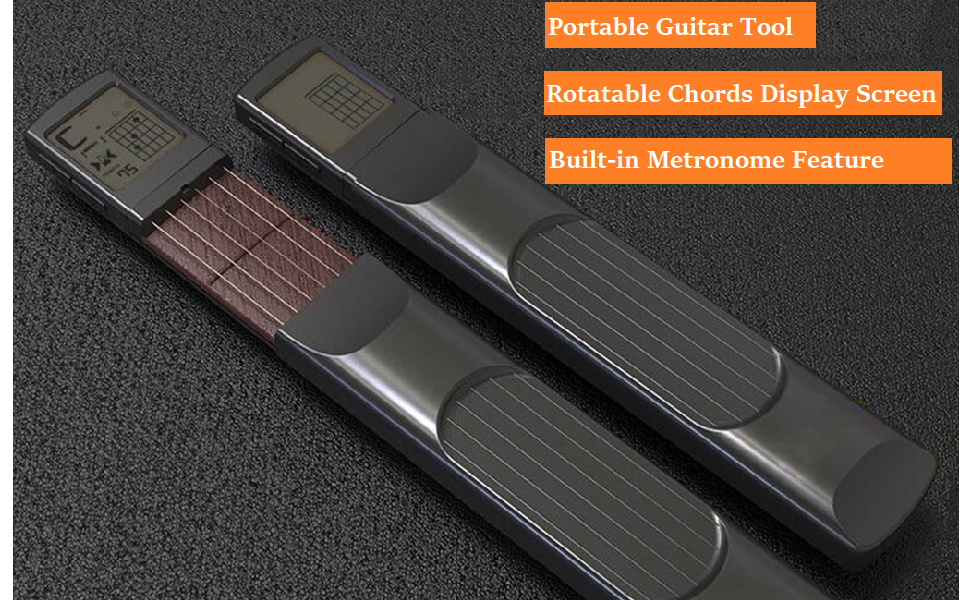
Portable Guitar Training Tool
Guitar Trainer aims to allow you to practice chords and fingering anytime and anywhere.
We built in most common guitar chords in our Pocket Guitar Chords Trainer.
The main feature is to reserve chords as you need. You can choose and reserve chords to practice one by one, or reserve the whole guitar chords of a song to practice songs directly.
Notes about Putting in Battery:
While putting in the battery, please push the battery case and put in the battery directly. Please do not remove the sponge spacer. Removing the sponge spacer will cause not to turn on.
2 Modes Operation: Chords Mode and Cycle Play Mode
1. Chords Mode: You can choose, reserve and delete chords in Chords Mode only.
2. Cycle Play Mode: Once you set a sequence of chords, switch to the Cycle Play Mode to play the reserved chords.
How to switch between the Chords Mode and Cycling Play Mode.
Press the Power button for 2 seconds to switch modes.
In Chords Mode, the screen shows the chord and fingering chart, it leaves blank at the bottom left of the screen.
In Cycling Play Mode, the screen shows the chord and fingering chart, it shows metronome icon and TEMPO at the bottom left of the screen.
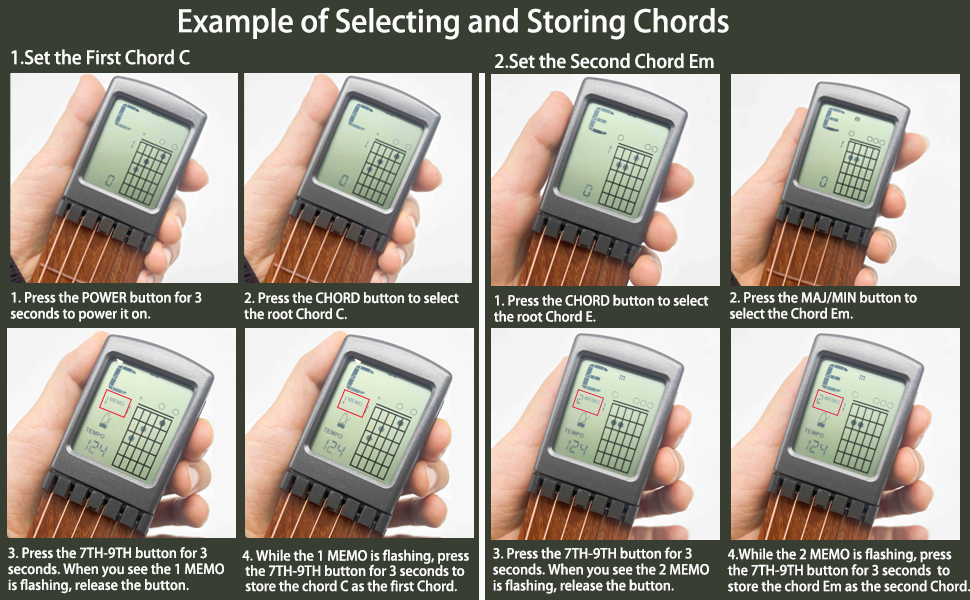
Store chords one by one in order to practice chords. For example: How to store a chord C and a Chord Em in order? Check the picture below
How to choose, reserve and delete chords?
1. Choose Chords: Switch to the Chords Mode, press the CHORD button, the 7TH-9TH button and MAJ/MIN button to choose needed chords.
2. Reserve chords: Once a chord is selected, press the 7TH-9TH button for 2 seconds to show and check the sequence of the chord.
In the middle of the screen, you will see MEMO and a flashing number, the flashing number represents the sequence of the chord.
While the number is flashing, you can single press the MAJ/MIN button to save the sequence of the chord.
After you confirm the sequence of a chord, press the 7TH-9TH button for 2 seconds to save it.
3. Delete Chords: If you need to delete chords, it needs to be in Chords Mode, too.
Press the 7TH-9TH button and MAJ/MIN button at the same time for 3 seconds to delete all stored chords.
How to run the cycle of reserved chords?
Press Power button for 2 seconds to switch to the Cycle Play Mode, single press Power button to play or pause and press 7TH-9TH button or MAJ/MIN button to adjust the metronome speed.
Practice more to develop muscle memory and improve fingers’ sensitivity.
Frequently Asked Questions:
- Question 1: What is this guitar trainer for?
- Answer: The guitar trainer is to practice pressing chords for your left hand. However please note it not works for left handed player.
- Question 2: Does this guitar trainer make a sound?
- Answer: The guitar trainer makes no sound, it is for practicing your left hand to press chords.
- Question 3: Can this tool be tuned?
- Answer: No, this guitar trainer has no sound, so it could not be tuned?
- Question 4: What is the allen wrench for?
- Answer: The allen wrench is for adjusting the tension of the strings, adjust to the same tension as on your real guitar.
- Question 5: How do you power the guitar training tool?
- Answer: This guitar training tool is powered by a CR2032 battery. We offered 2 pcs CR2032 batteries for every customers.
- Question 6: How to install a battery?
- Answer: While putting in the battery, please push the battery case and put in the battery directly. Please do not remove the sponge spacer. Removing the sponge spacer will cause not to turn on.
- Question 7: What to do if the tool could not turned on?
- Answer: Every guitar trainer comes with a spong spacer in the battery case, please do not remove the sponge spacer. If the spong spacer is removed by mistake, the tool not works any more. Please contact the seller to get a replacement.
- Question 8: Can this guitar chords trainer be used for left-hand player?
- Answer: This guitar chords trainer is designed for right-hand player to practice their left hand to pressing chords.


Reviews
There are no reviews yet.